

Studio Workflow
Tattoo Artist Website Blueprint: Pages, Portfolio, Booking and SEO
Plan a tattoo artist or tattoo shop website that makes style, location, portfolio and booking clear. Use this page-by-page blueprint for artists and studios.
tattoo artist website · tattoo shop website · tattoo studio website · tattoo booking website · tattoo portfolio website
- September 14, 2026
- September 15, 2026
- 18 min
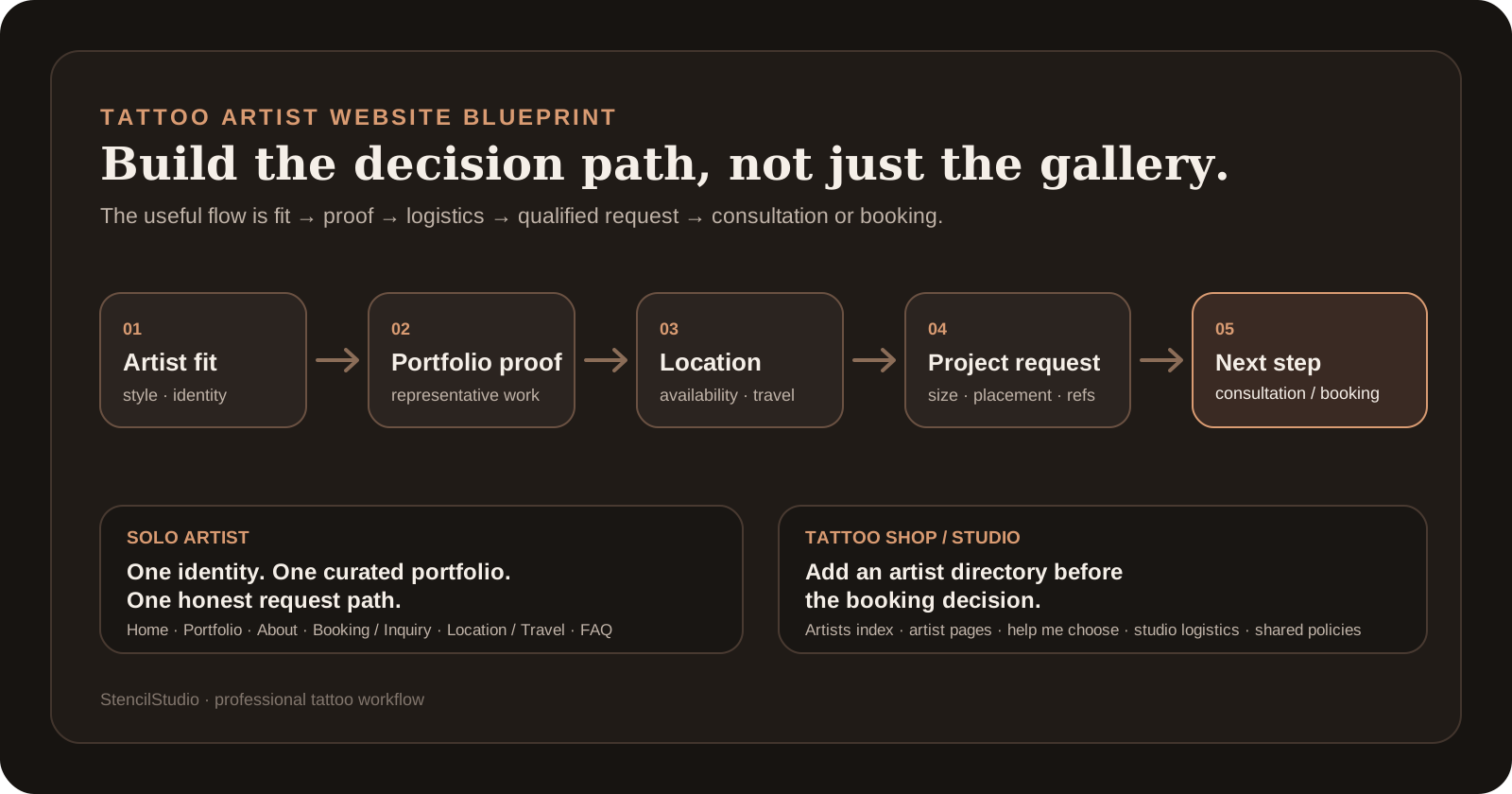
A good tattoo artist website should answer four questions quickly: What kind of work do you do? Where do you work? Can I see enough of your tattoos to know whether you fit my idea? What should I do next if I want to work with you?
Everything else is secondary.
A solo artist, private studio, and multi-artist tattoo shop can all use that same principle, but they should not look or behave exactly the same. A solo artist may need one clear portfolio and one inquiry route. A shop may need an artist directory, individual portfolios, and a way to help clients choose the right artist before they submit a request.
This guide shows what to put on a tattoo artist or tattoo shop website, how to structure the portfolio and booking flow, what matters for local search, and what to check before choosing a website builder.
What should a tattoo artist website include?
For most solo tattoo artists, a useful website can stay simple. The important thing is that every client question has an obvious place to be answered.
A strong basic structure is:
- Home: artist or studio name, style, city, current availability, and the main next step.
- Portfolio: a focused selection of completed tattoos that represents the work you want more of.
- About: who you are, how you work, and the studio or location clients will actually visit.
- Booking or inquiry: the real process for starting a project, requesting a consultation, or scheduling an eligible service.
- Location or travel: your home base plus current guest spots, travel dates, or multiple studio locations when relevant.
- FAQ or policies: the recurring questions that affect whether a client should inquire.
Those do not have to be six separate URLs. A small solo-artist site can combine some of them. What matters is that a new visitor can find the answer without hunting through menus, Instagram highlights, and old posts.
A separate Contact page is optional. If every tattoo request should go through one project form, a second generic contact form can create more confusion than value. Keep a general contact route only when you actually receive non-booking messages that need a different inbox.
For a multi-artist shop, add an Artists section early in the journey:
HOME
  -> ARTISTS
       -> ARTIST A: style + work + booking information
       -> ARTIST B: style + work + booking information
       -> ARTIST C: style + work + booking information
  -> BOOK / REQUEST HELP CHOOSING
  -> STUDIO / LOCATION
  -> FAQ / POLICIES
A client who wants black-and-grey realism should not have to open a generic 200-image gallery and guess which artist made what.
The homepage should answer fit before biography
The first screen does not need to tell your whole story. It needs to tell the right client whether they should keep looking.
Near the top of the homepage, make these things clear:
- your name or studio name;
- the tattoo work you want to be known for;
- your real city, studio, or service location;
- whether you are currently taking inquiries, opening books on a date, offering consultations, taking walk-ins, selling flash, or using another clear process;
- one obvious next action.
Then show enough work to support that promise.
A practical homepage order is:
- Name + style + location. A visitor should understand who you are and where you work immediately.
- Current availability. Say what clients can actually do now.
- Selected work. Show a small group of tattoos that represents the direction you want more of.
- Project fit. Explain the kinds of work you are interested in and any important boundary a client should know before inquiring.
- Full portfolio or artist profiles. Give people a clear way to see more.
- Studio and trust information. Location, process, policies, current social profiles, and anything else that helps a real client feel oriented.
- The next step again. After someone has seen the work, make it easy to start the correct inquiry or booking process.
The exact order can change. The important part is that a cinematic hero, logo animation, or full-screen video does not hide your city, your work, or the way to contact you.
Keep the tattoo portfolio focused
Your website does not need every tattoo you have ever made.
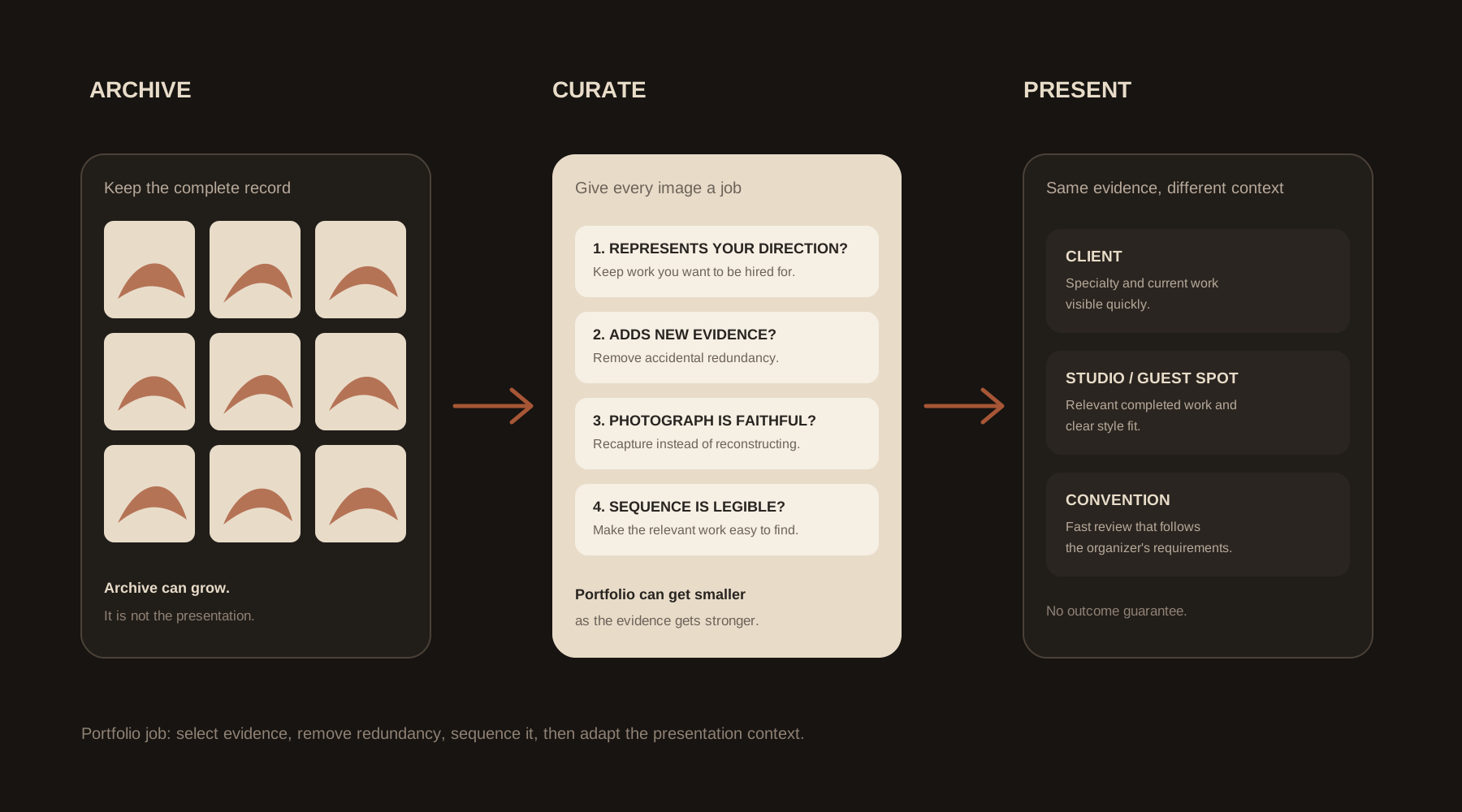
A good website portfolio should help a client understand your current work quickly. Lead with the tattoos you would genuinely like to be hired for again. Use enough examples to show consistency, but remove pieces that repeat the same point without adding anything useful.
On the website, the portfolio should:
- make your main styles or directions easy to recognize;
- separate artists clearly when the site represents a shop;
- work properly on a phone without hover-only controls;
- avoid loading unnecessarily huge original camera files;
- use fresh or healed labels only when they are accurate and useful;
- make the next step visible once the client has seen enough work.
For the deeper selection and sequencing job, use the Tattoo Artist Portfolio guide. For lighting, glare, angle, and faithful capture, use the Tattoo Photography guide. If an otherwise good tattoo photo only needs crop, straighten, or restrained tonal preparation, use the Tattoo Portfolio Photo Editor.
A website gives you more control than an endless social feed. Use that control to make the strongest work easier to find, not to publish the entire archive again.
Decide whether clients are requesting a tattoo or actually booking one
This is one of the most important wording choices on a tattoo website.
A button that says Book now can mean very different things:
- Project request first. The artist reviews idea, placement, size, references, timing, and fit before offering a consultation or appointment.
- Direct scheduling. The client can legitimately choose a service and available time without project approval first.
- Hybrid. Custom work starts with a project request, while defined services such as consultations, selected flash, touch-ups, or walk-ins can use direct scheduling.
If the artist still needs to review and accept the project, call the form what it is: a tattoo request, project inquiry, consultation request, or similar. Do not make the client think they have booked an appointment when they have only submitted an idea.
Ink & Dagger is a useful example of this distinction. Its tattoo form gathers project information and makes clear that submitting the request does not itself confirm an appointment.
What should a tattoo inquiry form ask?
Ask for information that helps you decide what happens next.
Common useful fields include:
- preferred artist, or a help-me-choose option for a shop;
- tattoo idea or subject;
- placement;
- approximate size;
- style or visual direction when it helps with artist matching;
- reference images;
- a body-area photo when placement, cover-up, or existing work materially affects the project;
- whether the project is a cover-up when relevant;
- broad timing or travel constraints;
- city or travel context when the artist works in several places;
- budget range only if you genuinely use it to qualify scope;
- reliable contact information.
Do not collect information just because a form builder offers the field. Medical intake, consent forms, and appointment-day paperwork usually belong later unless your real process requires them earlier.
Tell the client what happens after submit
The confirmation screen or email should answer the obvious next questions:
- Did the request arrive?
- Does the artist still need to accept the project?
- When should the client expect a response, if you publish a response window?
- Does a deposit come later?
- Should the client avoid sending the same request through DMs and email too?
- What should they do if travel dates make the project time-sensitive?
The best inquiry system is the one you can maintain consistently. Some artists prefer forms and email, some deliberately use DMs, and some separate project approval from calendar scheduling. Your website should make your own process clear rather than pretending there is one universal tattoo-booking system.
Once the project is understood, the Tattoo Project Quote Builder can handle the separate estimate step. It is not a booking system.
Solo tattoo artist website vs tattoo shop website
A solo tattoo artist and a multi-artist studio need different navigation even if they share many of the same pages.
Solo artist
A solo artist usually needs:
- one clear identity;
- one main portfolio built around current work;
- one inquiry or booking process;
- one home base plus travel information when relevant;
- policies written around that artist's actual process;
- a simple path from search or social media to the project form.
The site does not need to behave like a studio directory when the client is choosing one person.
Multi-artist shop or studio
A tattoo shop website usually needs:
- an artist directory before or near the booking route;
- an individual page for each active artist;
- each artist's main styles and representative work;
- the correct inquiry or booking state for each artist;
- a way to ask for help choosing an artist when the client knows the project but not the person;
- accurate studio address, hours or appointment model, and useful access information;
- shared policies only where they truly apply to the whole shop;
- fast cleanup of former-artist pages so clients do not submit requests to someone who no longer works there.
Ink & Dagger is a useful example because visitors can browse artists and styles, then its inquiry process lets them name a preferred artist or request help choosing one. The website supports the real studio structure instead of hiding everyone inside one generic gallery.
Traveling tattoo artists need current location and guest-spot information
If guest spots or travel are part of your work, make current availability easy to verify.
A useful travel section can show:
- your home city and studio;
- the next confirmed guest city;
- the date range;
- whether you are taking requests for that stop;
- the correct inquiry link;
- any real deadline you use;
- what happens after the dates pass.
Do not leave old guest dates in the main navigation indefinitely. Remove them, archive them clearly, or replace them with the next confirmed stop.
Convention appearances need the same clarity. Attending a convention is not automatically the same as accepting appointments there. If you publish a convention date, say whether clients can actually request a slot.
For artist-side event planning, use the U.S. Tattoo Conventions directory. Your own website should publish the availability and booking information you control.
Local SEO for tattoo artists starts with a real location
A tattoo website does not need dozens of copied city pages to rank locally. It needs to make the real business easy to understand.
For an eligible studio or local business:
- keep the real business name, address or service-area information, and contact details accurate;
- link the correct website from the verified Google Business Profile;
- keep website location details consistent with the real studio;
- create a useful page for each real studio location when locations genuinely differ;
- use individual artist pages when clients search by artist name and those artists actively work there;
- add useful text around galleries instead of publishing only unlabeled image grids;
- avoid city pages for places where the artist does not actually work.
Google Business Profile supports website and, for eligible businesses, booking or appointment links. Those links should point into the same current process your website already explains.
If you mention a license or permit as a trust signal, make sure the claim is accurate for the exact jurisdiction. U.S. tattoo regulation can be state-level, local, or mixed. Use the U.S. Tattoo Licensing guide as a starting point rather than making a blanket claim such as “licensed everywhere.”
Design the tattoo website for the phone first
Many clients will arrive from Instagram, Maps, a text message, or mobile search. Test the real path on a phone, including the portfolio and inquiry form.
Check that:
- artist name, style, city, and booking state are readable without zooming;
- galleries do not depend on hover;
- tap targets do not overlap;
- portfolio images are large enough to inspect without shipping huge originals unnecessarily;
- grids do not jump around while loading;
- the inquiry form is comfortable to complete on a phone;
- image uploads work from the photo library or camera flow;
- the submit state is obvious;
- sticky buttons do not cover fields or artwork;
- the important text and links are present on mobile as well as desktop.
Google uses the mobile version of a page for indexing and ranking and recommends responsive design as the easiest pattern to implement and maintain. Mobile is therefore not a final polish step. It is part of the actual website.
Show trust with specific information, not generic copy
A potential client is not only judging the tattoos. They also want to know whether the artist or shop is real, active, reachable, and clear about the process.
Useful trust information can include:
- the artist's real identity and current work;
- studio name and location;
- current official social profiles;
- healed work when you choose to publish it and know the stage accurately;
- clear booking availability and response expectations;
- policies that genuinely affect deposits, rescheduling, or project fit;
- genuine reviews or a link to a real review profile;
- current artist pages for a shop;
- accurate license or permit information when that credential is meaningful in the relevant jurisdiction.
A paragraph about “passion for ink” tells the client very little. Specific information about your work and process is far more useful.
How to choose a tattoo artist website builder
There is no universal best website builder for tattoo artists. Choose the platform that makes your actual site easy to maintain.
Before committing, check:
- Portfolio updates: can you add and replace work without rebuilding the site?
- Inquiry form: can it collect the fields and image uploads your process needs?
- Mobile form quality: can a client complete the real form comfortably on a phone?
- Scheduling: can it link or embed the scheduler you already use when direct scheduling is appropriate?
- Artist pages: can a multi-artist shop maintain separate artist profiles without hand-building every page?
- Basic SEO controls: can you edit page titles and descriptions, use clean URLs, add redirects, and control which pages are indexed?
- Custom domain: can you use a domain you control and keep it if you switch providers?
- Image performance: does the site stay fast with your actual portfolio, not just the empty template demo?
- Analytics: can you measure visits and completed inquiry actions without creating a maintenance burden?
- Leaving the platform: can you export what matters, retain your domain, and access your content if you migrate later?
Squarespace, Wix, and Webflow
Current product documentation shows that all three can cover common tattoo-site needs, but in different ways.
- Squarespace: form blocks support customizable forms and file uploads, while Acuity can handle scheduling when that fits the artist's process.
- Wix: Wix Forms supports uploads and Wix Bookings supports service-specific booking forms and scheduling.
- Webflow: custom forms and CMS collections can suit studios that want more control over structured artist pages and site design.
Do not pick a platform because an affiliate article ranks it first. Build your shortlist from the site you actually need to maintain.
Tattoo artist website examples worth studying
The useful question is not “Which tattoo site looks coolest?” It is “What does this site make easier for the client?”
Ink & Dagger: clear artist choice and inquiry flow
Ink & Dagger makes its multi-artist structure easy to understand. Visitors can browse artists and styles, then move into a detailed request process. The useful lesson is the connection between artist selection, portfolio, and project inquiry, not the visual theme itself.
Atelier Eva: artist pages plus clear booking expectations
Atelier Eva combines individual artist presentation with clear studio and booking information. Its FAQ asks clients for practical project details such as preferred artist, size, body location, references, and travel context. The useful lesson is that a polished portfolio still needs a clear intake process.
Strong solo-artist sites keep the first decision simple
A solo artist does not need to imitate a large studio. A strong solo site can be very small if it quickly shows the work, states the city and current availability, and gives the client one correct way to inquire.
Current tattoo-website example roundups also converge on the same basics: visible portfolio work, clear artist or studio identity, mobile usability, and an obvious booking or consultation route.
Common tattoo website mistakes
These problems make otherwise good tattoo sites harder to use:
- a homepage that never says where the artist works;
- hundreds of uncurated images with no clear specialty;
- a Book now button that actually opens an unreviewed contact request;
- direct calendar booking for custom projects that still need artist review;
- contradictory booking instructions across Instagram, email, and the website;
- stale “books open” or guest-spot dates;
- a shop gallery where clients cannot tell which artist made each tattoo;
- hover-only gallery controls;
- huge image files or autoplay video that make the portfolio painful on mobile;
- a vague contact form that forces the artist to ask for size, placement, and references again;
- generic bios that could describe any creative business;
- fake testimonials, fake awards, or unsupported claims;
- copied licensing or hygiene language that does not match the jurisdiction;
- city landing pages for places where the artist does not actually work.
A simple tattoo artist website blueprint
Use this as a planning checklist, not as a rule that every section needs its own URL.
SOLO ARTIST

HOME
  Shows: name + style + city + current availability + selected work
  Next step: view portfolio / start project request

PORTFOLIO
  Shows: current work and the styles you want more of
  Next step: start project request

ABOUT
  Shows: artist identity, approach, studio relationship
  Next step: view work / inquire

BOOKING OR INQUIRY
  Explains: how projects start and what information you need
  Next step: submit request OR schedule an eligible service

LOCATION / TRAVEL
  Shows: home base + current guest or travel dates
  Next step: request the correct place and date

FAQ / POLICIES
  Answers: recurring questions that affect booking
  Next step: start the correct inquiry path
For a tattoo shop:
MULTI-ARTIST SHOP

HOME
  -> ARTISTS
       -> ARTIST PAGE: styles + portfolio + current booking state
       -> ARTIST PAGE: styles + portfolio + current booking state
  -> HELP ME CHOOSE AN ARTIST
  -> BOOK / REQUEST
  -> STUDIO / LOCATION
  -> FAQ / SHARED POLICIES
Run this 30-minute tattoo website audit
Open your current site on a phone and answer these questions in order:
- Can a new visitor tell what kind of tattoo work you do within the first screen and first few images?
- Can they see your real city or studio without searching the footer?
- Can they tell whether you are currently accepting their type of request?
- If you are a shop, can they reach the right artist quickly?
- Does the portfolio show the work you want more of?
- Does the main button accurately describe what happens next?
- Does the inquiry form collect size, placement, and references when you need them?
- Can the client upload those references comfortably from a phone?
- Does the confirmation message explain what happens after submit?
- Are guest dates, booking status, policies, and artist profiles current?
- Does every public location page represent a place where you actually work?
- Can you update the portfolio and availability without needing a developer every time?
A “no” here is usually more important than changing fonts, adding another animation, or redesigning the logo.
Moving from Instagram-only to your own website
You do not need to launch a huge site on day one.
Build in this order:
- Secure the domain you want to keep.
- Publish a homepage with your identity, main style, city, availability, and one correct CTA.
- Add the curated portfolio or artist profiles.
- Build the real inquiry or booking process and test it on a phone.
- Add location, travel, and the policies that repeatedly affect inquiries.
- Link the site from current social profiles and Google Business Profile when eligible.
- Add simple analytics for visits and completed inquiry actions.
- Only then spend time on secondary pages, motion, and decorative polish.
The site is doing its job when the right client can understand your work and start the right conversation without guessing what to do next.
FAQ
Do tattoo artists need a website if they already use Instagram?
Instagram can still be useful for discovery and current work, but a website gives you a stable place to organize your portfolio, explain your location and booking process, publish policies, and control the path into an inquiry. You do not need to abandon social media. Use the website as the reliable home for information that should not disappear in a feed.
What pages should a tattoo artist website have?
A solo artist usually needs a homepage, portfolio, about information, booking or inquiry process, location or travel details, and a short FAQ or policy section. Those can be separate pages or combined on a smaller site. A tattoo shop normally also needs an artist directory and individual artist pages.
What should be on a tattoo artist homepage?
Show the artist or studio name, main tattoo styles, real location, current booking state, representative work, and one clear next step. A new client should not need to open several pages just to learn what you tattoo and how to inquire.
What is the best website builder for tattoo artists?
There is no universal best choice. Pick a platform that lets you update the portfolio easily, collect the project information you need, handle image uploads on mobile, use your own domain, control basic SEO settings, and connect to the scheduling process you actually use.
Should a tattoo website use online booking?
Use direct online booking only when the service can genuinely be scheduled without prior project approval. Custom tattoo work often needs an inquiry or consultation first. The website should make that distinction clear so a request is not mistaken for a confirmed appointment.
How should a tattoo shop organize multiple artists?
Give each active artist a clear page with their main styles, representative work, current booking status, and the correct next step. Also provide a way for clients to ask for help choosing an artist when they know the project but not the person.
Sources and current examples
- Google: mobile-first indexing best practices
- Google Business Profile: edit your profile and website
- Google Business Profile: manage local business and booking links
- Squarespace: form blocks
- Squarespace: scheduling blocks
- Wix: booking forms
- Wix: file uploads in forms
- Webflow: forms
- Webflow: CMS collections
- Ink & Dagger: artists
- Ink & Dagger: booking
- Atelier Eva: booking FAQ
- Tattoo Studio Pro: tattoo website examples
Related Guides
Keep reading from here
Tattoo Artist Portfolio: Curate Work for Clients, Studios and Conventions
Build a professional tattoo artist portfolio from completed work. Learn what to include, what to cut, how to order photos, and how to tailor it for clients, guest spots, studios, and conventions.
tattoo artist portfolio · tattoo portfolio
Read guide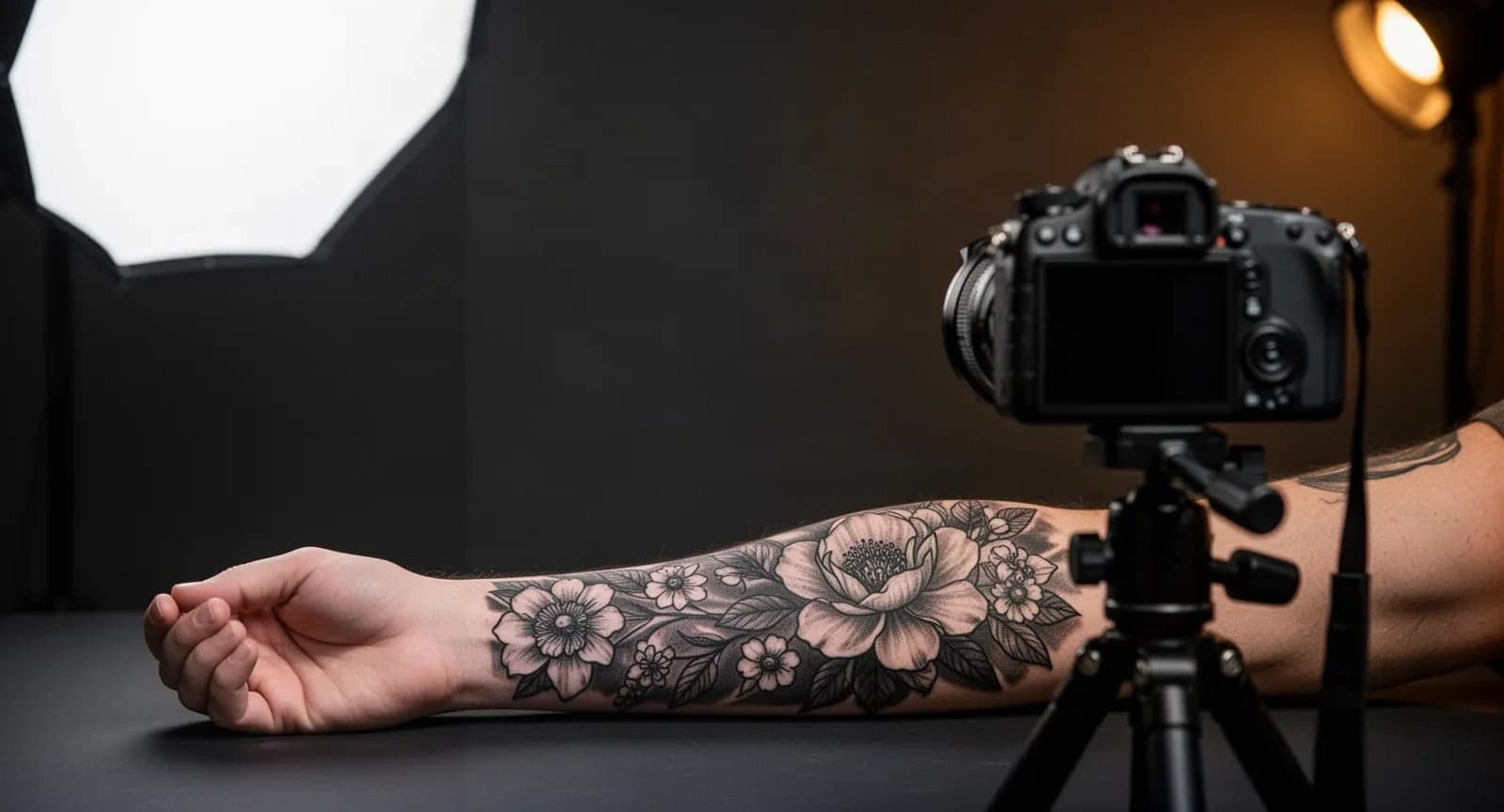
Tattoo Photography for Artists: A Repeatable Portfolio Workflow
Photograph finished tattoo work with controlled lighting, glare reduction, faithful geometry, consistent color, and honest editing boundaries.
tattoo photography · how to photograph tattoos
Read guideAuthor
Andrea Mezzadra
Founder and product builder at StencilStudio
Andrea builds StencilStudio and tests how the tools fit into real stencil prep, using real references and outputs to document what works, what changes, and where artist judgment still matters.
In the App
Turn a qualified inquiry into a clear estimate
Once the project scope is clear, build an artist-controlled estimate with session assumptions, deposit, discount and client-facing notes.